Understanding HTML document structure is one of the best starting points for learning how websites work. Behind even an elaborate web page is an organised HTML document that gives the browser instructions about the content it receives.
You can think of an HTML document rather like a filing cabinet. The cabinet provides the overall structure, while individual drawers and folders organise different types of information. HTML performs a similar job by arranging web content into a logical hierarchy.
Once you understand this basic framework, seemingly complicated HTML becomes much easier to follow.
1. What Is HTML Document Structure?
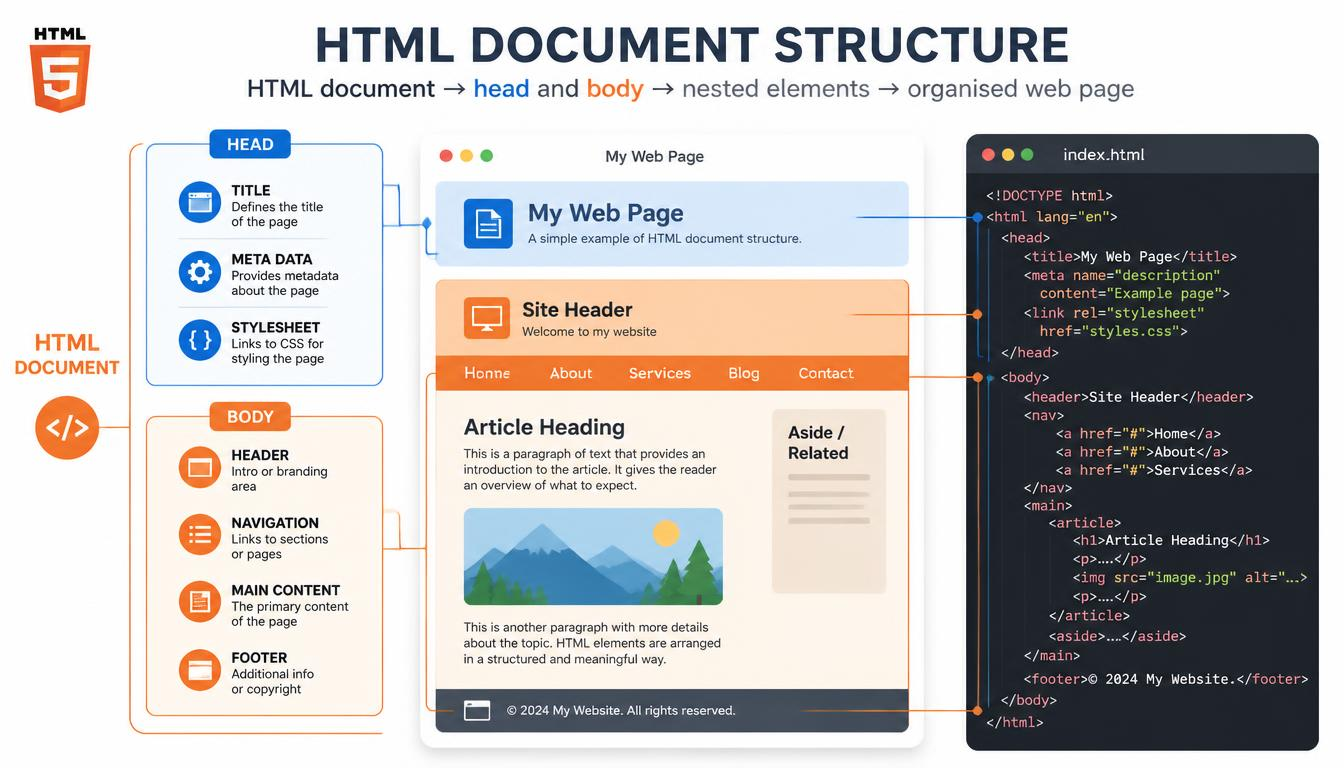
An HTML document consists of elements arranged in a particular hierarchy. Some describe the document itself, while others identify headings, paragraphs, links, images and other content.
The anatomy of a basic HTML web page can be demonstrated with a very small document:
<!DOCTYPE html>
<html lang="en">
<head>
<title>My First Web Page</title>
</head>
<body>
<h1>Hello World</h1>
<p>This is my first web page.</p>
</body>
</html>
Although this example contains very little content, it has the essential framework of a genuine HTML page.
If HTML itself is unfamiliar, Hypertext Markup Language Explained provides a beginner-friendly introduction.
2. The DOCTYPE and HTML Element
The first line is:
<!DOCTYPE html>The DOCTYPE declaration tells a browser that the document should be interpreted as modern HTML. It isn’t an HTML element itself but provides important information about the document that follows.
Next comes:
<html lang="en">The <html> element is the root element of the page. Almost everything else in the document sits inside it.
The lang=”en” attribute identifies the language of the page as English. This information can be useful to browsers, search engines and assistive technologies such as screen readers.
For more about the tags used to construct pages, see HTML Tags Explained.
3. Understanding the Head and Body
Inside the <html> element, a basic page is divided into two important areas: <head> and <body>.
Understanding the head and body sections in HTML is straightforward once you recognise that they perform very different jobs.
4. What Goes Inside the HTML Head?
The <head> contains information about the document rather than the main content displayed on the page.
For example:
<head>
<title>Learning HTML</title>
<meta charset="UTF-8">
</head>
The <title> element supplies the page title used by browsers and commonly displayed on browser tabs.
The head can also contain metadata, links to stylesheets and other information needed by the browser or search engines.
Much of this information isn’t directly visible within the page itself, but it can still influence how the document is processed and presented.
5. What Goes Inside the HTML Body?
The <body> contains the content people normally see and interact with.
That might include:
- Headings
- Paragraphs
- Images
- Hyperlinks
- Lists
- Tables
- Forms.
- Video and audio
For example:
<body>
<h1>Welcome to My Website</h1>
<p>This is my first paragraph.</p>
</body>
This distinction between document information and visible content is fundamental to building a correctly structured HTML document.
The Web.dev guide to HTML document anatomy provides further information about these fundamental components.
6. How HTML Elements Organise Page Content
Once inside the body, HTML elements give the content both organisation and meaning.
A heading isn’t simply made larger because it looks attractive. The <h1> element identifies it as the principal heading of the document. Similarly, <p> identifies a paragraph and <a> identifies a hyperlink.
This is the basis of how HTML elements organise page content.
7. Elements Create a Hierarchy
HTML elements are commonly placed inside other elements. This is known as nesting.
Consider:
<article>
<h2>Learning HTML</h2>
<p>HTML gives web content structure.</p>
</article>
Here, the heading and paragraph are both contained within the <article> element.
As documents become larger, this nesting creates a tree-like hierarchy. Browsers use that hierarchy when interpreting and constructing the page.
You can explore what happens after the browser receives the document in How Browsers Read HTML.
Structure Also Gives Content Meaning
Modern HTML includes elements such as <header>, <nav>, <main>, <article>, <section> and <footer>.
These are known as semantic elements because their names indicate the purpose of the content they contain.
For example, <nav> identifies an area containing navigation, while <article> indicates a self-contained piece of content.
This can make documents easier for developers and technologies such as search engines and screen readers to understand. Semantic HTML Explained examines this concept in greater detail.
Why Correct HTML Structure Matters
A browser can sometimes compensate for imperfect HTML, which may give beginners the impression that structure doesn’t matter. However, consistently organised markup has several advantages.
Correct structure makes HTML easier to read, edit and maintain. It can also support accessibility and help browsers interpret content predictably.
The GeeksforGeeks guide to HTML document structure provides additional examples of the standard page framework.
It is also important to remember that HTML primarily describes structure rather than appearance. CSS controls much of a page’s visual presentation, while JavaScript can add interactive behaviour. CSS and HTML: What’s the Difference? explains the first of these relationships.
Building Your First HTML Document
One of the easiest ways to understand HTML is to create a very small page yourself.
Start with the DOCTYPE, add the <html> element, create <head> and <body> sections, and then place a heading and paragraph inside the body.
That simple exercise demonstrates the fundamental hierarchy:
Document → HTML → Head and Body → Page Elements → Content
From there, you can gradually introduce links, images, lists and semantic elements without changing the underlying principle.
Understanding HTML document structure therefore gives you more than a collection of tags to memorise. It provides a mental model of how a web page is organised. Once the relationship between the document, head, body and individual elements makes sense, learning the rest of HTML becomes considerably easier.