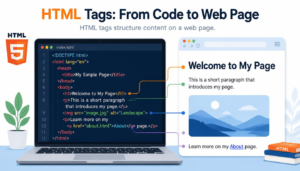

JavaScript and HTML work together to transform a structured webpage into an interactive experience. HTML defines the content and underlying structure of the page, while JavaScript adds behaviour and responds to actions such as clicks, form input and other events. Through the Document Object Model, JavaScript can access and modify HTML elements after a page has loaded.
This article explores how JavaScript interacts with HTML elements, explains DOM manipulation with JavaScript and examines the relationship between HTML structure and JavaScript functionality. Together, these technologies allow webpages to respond dynamically to users rather than remaining as static documents.
HTML Provides the Structure JavaScript Can Use
HTML is the foundation of a webpage. It identifies content such as headings, paragraphs, links, images, forms and sections using elements that a browser can recognise.
If you are new to markup, HyperText Markup Language explains HTML’s fundamental purpose, while HTML Document Structure looks at how those elements are organised into a complete document.
JavaScript performs a different job. Rather than defining the basic structure of the document, it can add behaviour to that structure.
JavaScript Adds Behaviour to HTML Pages
Consider a simple button created with HTML. HTML can identify that an element is a button and provide the words displayed on it. JavaScript can determine what happens when someone presses it.
That action might reveal previously hidden information, change an image, perform a calculation or update part of the page without requiring the visitor to load an entirely new document.
The distinction is similar to the separation between structure and presentation explained in CSS and HTML Difference. HTML provides structure, CSS controls presentation and JavaScript can add behaviour.
JavaScript Can Be Connected to HTML
JavaScript can be included directly within an HTML document using the <script> element. However, scripts are frequently stored in separate .js files and connected to the HTML document.
Keeping JavaScript in separate files can make larger websites easier to organise and maintain because structure and programming logic do not all have to occupy the same document.
The Programiz guide to HTML and JavaScript provides practical examples of the different ways JavaScript can be used with HTML.
JavaScript Interacts with the Document Object Model
To understand how JavaScript interacts with HTML elements, it helps to know what happens when a browser receives an HTML document.
The browser does not simply display the source code exactly as written. It parses the HTML and creates an internal representation called the Document Object Model, usually shortened to DOM.
Our guide to How Browsers Read HTML examines this process from the original markup through to the rendered webpage.
The DOM Represents the HTML Document

The DOM represents a webpage as a hierarchy of related objects or nodes. An HTML document might contain a <body>, which contains a <main> element, which in turn contains headings, paragraphs and other elements.
These relationships form a tree-like structure that software can work with.
This is one reason well-organised HTML remains important even when JavaScript is being used. Semantic HTML explains how meaningful elements can describe the purpose of different areas of a document.
DOM Manipulation with JavaScript
DOM manipulation with JavaScript means using JavaScript to access or change this browser representation of the document.
A script can locate a particular element and change its text. It can alter an attribute, add a CSS class, create a new element or remove an existing one. These changes can then appear on the screen without rewriting the original HTML file.
For example, imagine an HTML paragraph containing a short message. JavaScript could locate that paragraph through the DOM and replace its contents after someone presses a button.
The original HTML establishes that the paragraph exists; JavaScript controls what happens to it.
HTML and JavaScript Create Interactive Webpages
The most visible benefit of combining JavaScript and HTML is interaction. A purely structured document can present information and links, but JavaScript allows a page to react to what is happening.
JavaScript Responds to Events
An event is something that occurs in or around a webpage. Clicking a button is an event, but so are typing into a form field, moving a pointer, submitting a form and pressing a key.
JavaScript can listen for selected events and run instructions when they occur.
A form, for example, may be constructed using HTML elements. JavaScript can respond when the user submits it and check whether particular information has been entered before further action is taken.
Modern HTML itself has become considerably more capable, as explored in HTML5 Features. JavaScript nevertheless provides the programming logic required for more sophisticated interactions.
Structure and Functionality Remain Different Responsibilities
The relationship between HTML structure and JavaScript functionality is easier to understand when their responsibilities remain distinct.
HTML describes the content and its structure. JavaScript supplies instructions and logic that can act upon that structure. CSS can then control how the resulting elements appear.
This distinction also helps explain why HTML itself is not normally considered a programming language. As discussed in Is HTML a Programming Language?, HTML is a markup language. JavaScript, by contrast, is a programming language capable of variables, calculations, decisions and other forms of program logic.
The three technologies therefore have complementary roles: HTML provides structure, CSS provides presentation, and JavaScript provides behaviour.
Conclusion
Understanding JavaScript and HTML is ultimately about understanding this partnership. HTML gives a webpage an organised foundation, while JavaScript can use that foundation to respond to users, modify content and create the interactive experiences that are now commonplace across the web.