

The CSS and HTML difference becomes clear when you look at the separate jobs they perform on a webpage. HTML provides the content and underlying structure, identifying elements such as headings, paragraphs, links and images. CSS controls how those HTML elements are presented, including colours, fonts, spacing, positioning and responsive layouts.
Although they perform different roles, the two technologies are designed to work together. This article explains HTML structure and CSS presentation, explores how CSS styles HTML elements and shows how the relationship between HTML content and CSS design turns a structured document into a visually organised webpage.
HTML Provides the Structure of a Webpage
HTML stands for HyperText Markup Language. Its primary job is to describe the content and structure of a web document.
HTML uses elements to identify different types of content. <h1> represents a main heading, <p> defines a paragraph and <a> creates a hyperlink. Other elements identify images, lists, tables and sections of a document.
You can explore these building blocks further in HTML Tags Explained and see how they fit together in HTML Document Structure.
HTML Gives Content Meaning
HTML does more than determine where content appears in a document. Appropriate elements can also describe what that content means.
For example, HTML5 elements such as <nav>, <main>, <article> and <footer> identify the purpose of different areas of a page. This is explored more fully in Semantic HTML.
This structural role is fundamental to understanding the different roles of HTML and CSS. HTML describes the document; it is not primarily responsible for decorating it.
CSS Controls the Presentation
CSS stands for Cascading Style Sheets. It provides instructions telling a browser how HTML elements should be displayed.
CSS can control colours, typefaces, text sizes, margins, borders, backgrounds and many other visual properties.
How CSS Styles HTML Elements
A CSS rule identifies one or more HTML elements and assigns presentation properties to them. A stylesheet might instruct the browser that every <h2> heading should use a particular font size or that paragraphs should have additional spacing beneath them.
This separation means the same HTML structure can take on dramatically different appearances simply by changing the CSS.
Understanding how CSS styles HTML elements also explains why modern websites can maintain a consistent appearance across hundreds or thousands of pages. Common styling rules can be stored in stylesheets rather than repeated throughout every HTML document.
For a practical introduction to both technologies, W3Schools HTML and CSS provides examples of how they work together.
CSS Handles Layout and Responsive Design
CSS is also responsible for much of a webpage’s layout. Technologies such as Flexbox and CSS Grid allow developers to arrange elements into rows, columns and more complex structures.
CSS media queries can change those arrangements according to characteristics such as screen width. The same HTML content can therefore be presented differently on a desktop monitor and a smartphone without requiring two separate documents.
HTML and CSS Work Together
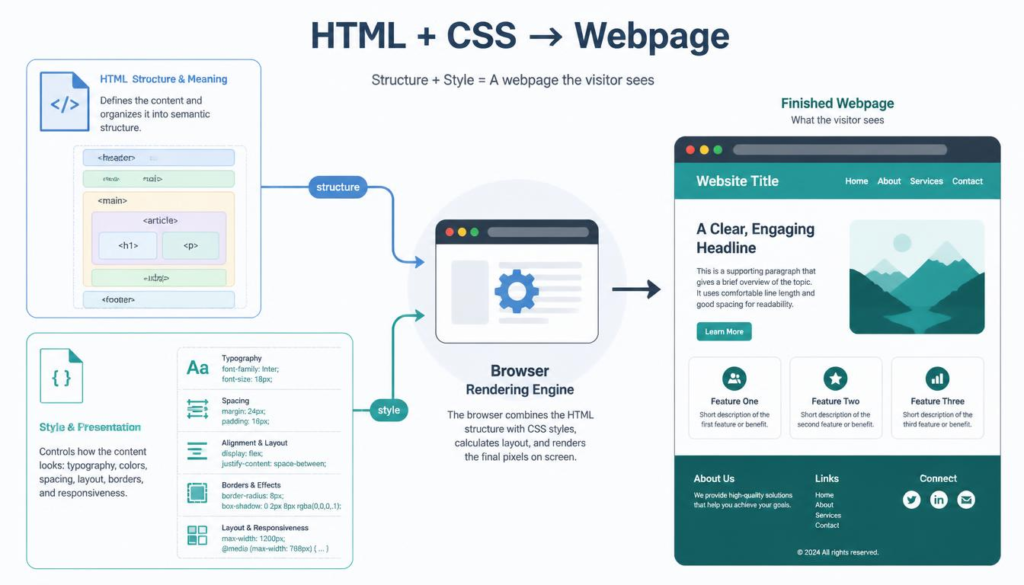
Although separating their responsibilities helps explain the CSS and HTML difference, real webpages normally depend on both.
The browser reads the HTML and constructs a representation of the document. It then considers the CSS rules that apply to those elements before calculating their size, position and appearance. How Browsers Read HTML explains this rendering process in more detail.
Structure First and Presentation Second
Imagine an article containing a title, several headings, paragraphs and an image. HTML identifies each of those components and their relationships. CSS then determines whether the title is large or small, how wide the article appears, how much space surrounds the image and how the layout adapts to different screens.
This relationship between HTML content and CSS design allows structure and appearance to remain logically separate.
JavaScript can add another layer by introducing behaviour and interaction. Our guide to JavaScript and HTML explains how scripting differs from HTML’s structural role.
The distinction is therefore straightforward: HTML says what the content is; CSS says how it should look.
Comprehending HTML structure and CSS presentation makes the architecture of a webpage much easier to grasp. Neither technology replaces the other. Instead, they perform complementary jobs, combining meaningful content and structure with the visual design that turns an HTML document into the webpage we recognise on the screen.
Understanding the CSS and HTML difference makes it easier to see how structure and design work together to create a complete webpage.
“True engineers are lazy good-for-nothings — because they design once, and let the system do the rest.”
Stephenism
🎵 Soul from the Solo Blogger — Tunes from Túrail.