
Semantic HTML gives web page content meaning as well as structure. Instead of using generic containers for almost everything, it uses descriptive elements such as <header>, <nav>, <main>, <article> and <footer> to indicate the purpose of different parts of a page.
For beginners, this might initially appear to be little more than choosing one HTML tag instead of another. However, meaningful HTML elements for better web structure can make pages easier for browsers, search engines, assistive technologies and developers to understand.
If you’re unfamiliar with the basics, our introduction to Hypertext Markup Language explains how HTML provides the underlying structure of web pages.
What Is Semantic HTML?
The word semantic relates to meaning. In HTML, a semantic element describes the role of the content it contains.
Consider two ways of identifying the main navigation area of a website:
<div class="navigation">...</div>and:
<nav>...</nav>Both can be styled to look identical in a browser. However, <nav> tells anyone or anything examining the HTML that the enclosed content represents navigation. A <div> merely says that the content has been placed inside a generic division.
This is the fundamental idea behind semantic HTML: choose an element according to what the content means, rather than simply how you want it to look.
The distinction becomes clearer once you understand how HTML tags work and how they identify different types of content.
Semantic and Non-Semantic HTML
Not every HTML element carries an obvious meaning.
Elements such as <div> and <span> are considered non-semantic because their names don’t explain what their content represents. They remain extremely useful, particularly when a generic container is genuinely what you need.
Semantic elements are more descriptive. Someone reading:
<article>...</article>can immediately make a reasonable assumption about the content inside it.
This doesn’t mean that <div> is bad HTML or should never be used. The objective is simply to use a more meaningful element when one exists and accurately describes the content.
The Semrush guide to semantic HTML provides a useful comparison between semantic and non-semantic markup and demonstrates how descriptive elements make page structure clearer.
Common Semantic HTML5 Elements
HTML contains numerous semantic elements, but beginners can understand much of a typical web page by becoming familiar with a relatively small group.
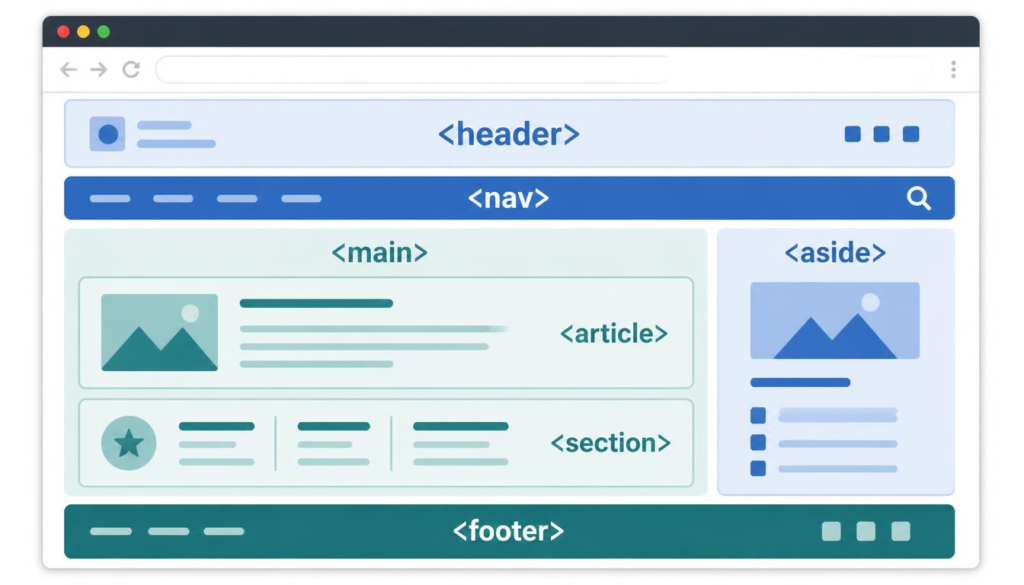
Imagine a conventional article page. It might contain a site header at the top, navigation underneath, the main article in the centre, related information alongside it and a footer at the bottom. Semantic elements allow the HTML itself to describe those roles.
<header> — Introductory Content
The <header> element represents introductory content for a page or section. It might contain a website name, heading, introductory information or other material that establishes what follows.
A page can contain more than one <header>. For example, the website may have a main header while an individual <article> has its own header.
<nav> — Navigation Links
The <nav> element identifies an important collection of navigation links.
A site’s primary menu is an obvious example. It could contain links to sections such as Home, About and Contact. It may also be used for significant navigation within a page.
Not every group of links requires <nav>. The element is intended for major navigation rather than every hyperlink that happens to appear together.
<main> — The Main Page Content
The <main> element identifies the dominant content of the page — the material that is central to why the visitor came there.
On an article page, for example, <main> would normally contain the article rather than repeated elements such as the site’s main navigation or footer.
This contributes to an accessible page structure with semantic HTML because the purpose of the central content is explicitly identified rather than inferred from its position or appearance.
<article> and <section> — Organising Related Content
An <article> represents self-contained content that could potentially make sense independently. Blog posts, news stories and forum posts are common examples.
A <section>, by contrast, groups related material within a document. A long article might therefore contain several sections dealing with different aspects of the overall subject.
The distinction can occasionally feel ambiguous. A useful beginner’s question is: Could this content reasonably stand on its own? If so, <article> may be appropriate. If it is simply one thematic part of a larger document, <section> may be the better choice.
<aside> and <footer> — Supporting Information
The <aside> element represents content related to, but not central to, the surrounding material. Examples might include supplementary information, related links or a sidebar.
The <footer> identifies concluding information for a page or section. A website footer might contain copyright information, contact details, policies and secondary navigation.
Together, these elements can create a semantic web layout using HTML5 elements that is understandable from the markup itself.
You can see how these elements fit into the wider hierarchy of a page in our guide to HTML document structure.
Why Semantic HTML Matters
The advantage of semantic markup isn’t that <article> somehow looks better than <div>. In fact, CSS can make either one look almost any way you choose.
The benefit lies in the additional meaning carried by the markup.
7 Powerful Benefits of Semantic HTML
- Clearer page structure
Descriptive elements make it easier to recognise the different parts of a document. Someone examining the source can distinguish navigation, primary content, individual articles and supporting material without deciphering numerous generic containers. - Better accessibility
Semantic elements can provide useful structural information to assistive technologies. This can help people using screen readers understand and navigate a page more effectively.
Codecademy’s introduction to semantic HTML and accessibility discusses how elements such as <nav>, <header>, <footer> and <article> give sections of a page recognisable roles. - More understandable markup
Code isn’t only read by browsers. Developers may return to a page months or years later, while other people may eventually need to maintain it. Descriptive markup can make the purpose of each section considerably easier to recognise. - Better information for search engines
Search engines analyse page content and structure to understand what a page contains. Semantic markup provides additional clues about the role and relationship of different sections.
This is part of how semantic HTML improves search and accessibility, although simply replacing <div> elements with semantic tags should not be regarded as a magic SEO ranking technique. - Cleaner separation between structure and presentation
HTML should primarily describe content and structure, while CSS controls presentation.
Using an HTML heading because the content genuinely represents a heading is semantic. Choosing a heading merely because its default appearance happens to be large and bold is not.
The relationship between the two technologies is explored further in CSS and HTML: What’s the Difference?. - More maintainable websites
A well-organised document is generally easier to modify. Descriptive elements reduce the amount of detective work required to understand what different areas of a page are intended to do.
This becomes increasingly valuable as websites become larger and more complicated. - A stronger foundation for modern web development
Semantic elements encourage developers to think about the purpose and hierarchy of their content before worrying about its appearance.
They became an increasingly important part of modern HTML as the language developed beyond the relatively simple documents of the early web. Our guide to HTML5 features explores some of the broader changes introduced as HTML matured.
The browser still has the job of parsing this markup and turning it into the page you see on screen. If you’d like to understand that process, How Browsers Read HTML follows the journey from HTML source code to rendered web page.
Semantic HTML ultimately comes down to a remarkably simple principle: use the element that best describes what your content actually is.
You don’t need to memorise every semantic element before using them. Start with the obvious ones — <header>, <nav>, <main>, <article> and <footer> — and gradually introduce others as their purpose becomes clear.
The result is HTML that doesn’t merely arrange content on a screen. It describes that content in a meaningful way, creating web pages that are easier for people, browsers, search engines and assistive technologies to understand.