Hypertext markup language, usually shortened to HTML, is the foundation on which almost every web page is built. Whenever you read an article, follow a link, view an image or complete a form online, HTML is helping to organise the content behind the scenes.
Despite its importance, HTML is relatively straightforward to understand. It does not perform calculations or make decisions like a programming language. Instead, it describes the structure and purpose of information so that a web browser knows what it is dealing with.
Think of HTML as the framework of a house. It establishes where the rooms, doors and windows belong. Other technologies can then decide how the house looks and what happens inside it.
This introduction covers seven basic ideas that will give you a practical understanding of how HTML works.
1. What Is Hypertext Markup Language?
HTML stands for Hypertext Markup Language. The name becomes much easier to understand when divided into its two main ideas: hypertext and markup.
2. What Does Hypertext Mean?
Hypertext is text that can connect to other information through hyperlinks. Instead of reading information only from beginning to end, a reader can select a link and move to another page, document or resource.
That ability to connect documents was fundamental to the development of the World Wide Web.
If you would like to explore the idea further, What Does Hypertext Mean? looks specifically at how linked information works.
A hyperlink in HTML is commonly created with an anchor element:
<a href="page.html">Read more</a>The href attribute tells the browser where the link should lead.
3. What Does Markup Mean?
Markup describes the labels added to content to identify what that content represents.
For example:
<h1>My First Web Page</h1>The <h1> and </h1> tags identify the enclosed words as a main heading.
Similarly:
<p>This is a paragraph.</p>tells the browser that the enclosed text is a paragraph.
HTML therefore provides web page markup and content structure rather than simply storing unorganised text.
For a closer look at the difference between tags and complete elements, see HTML Tags Explained.
Tags Are Instructions About Content
Tags are written inside angle brackets. Most elements have an opening tag and a closing tag, although some HTML elements do not require a separate closing tag.
The tags themselves normally remain invisible to someone viewing the finished page. The browser interprets them and presents the enclosed content appropriately.
4. How Does HTML Build a Web Page?
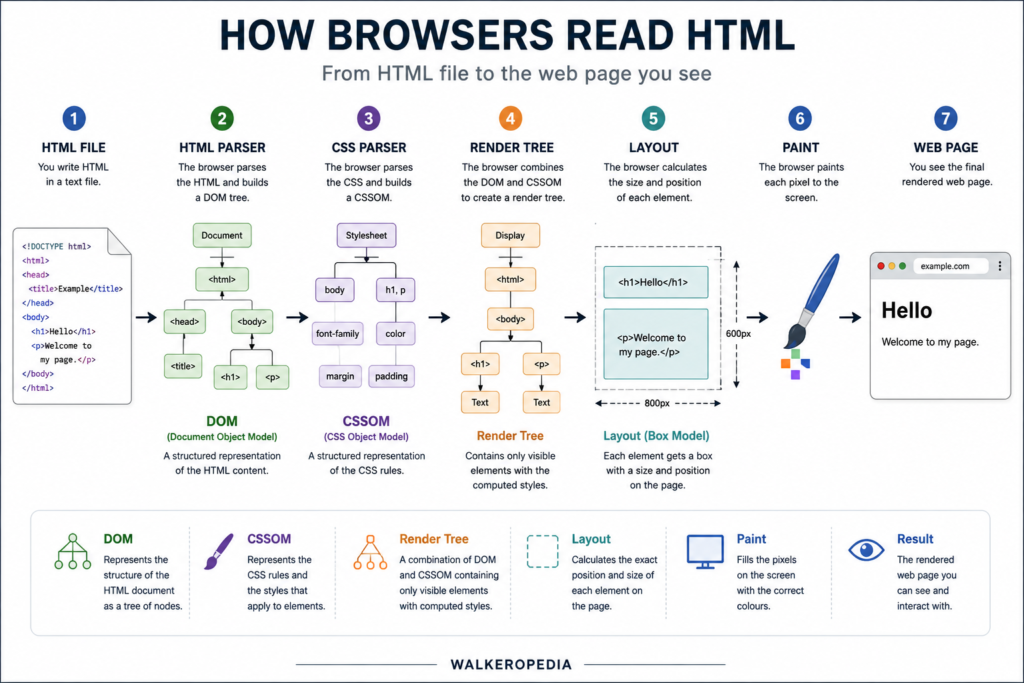
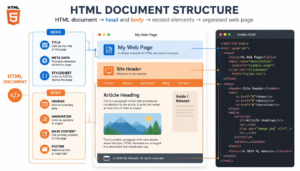
An HTML page is a structured document containing elements nested inside other elements. This creates a hierarchy that browsers can interpret.
5. Understanding HTML Elements
HTML elements are the building blocks of a page. Different elements identify different types of content.
Common examples include:
- <h1> for the principal heading
- <p> for a paragraph
- <a> for a hyperlink
- <img> for an image
- <ul> for an unordered list
- <li> for a list item
This is why HTML is often described as the HTML language for building web pages. More precisely, however, it is a markup language rather than a programming language. W3Schools describes HTML as the standard markup language for creating web pages and explains that its elements describe page structure. W3Schools HTML Tutorial.
If you are curious about the distinction, Is HTML a Programming Language? examines the question in more detail.
6. The Basic Structure of an HTML Document
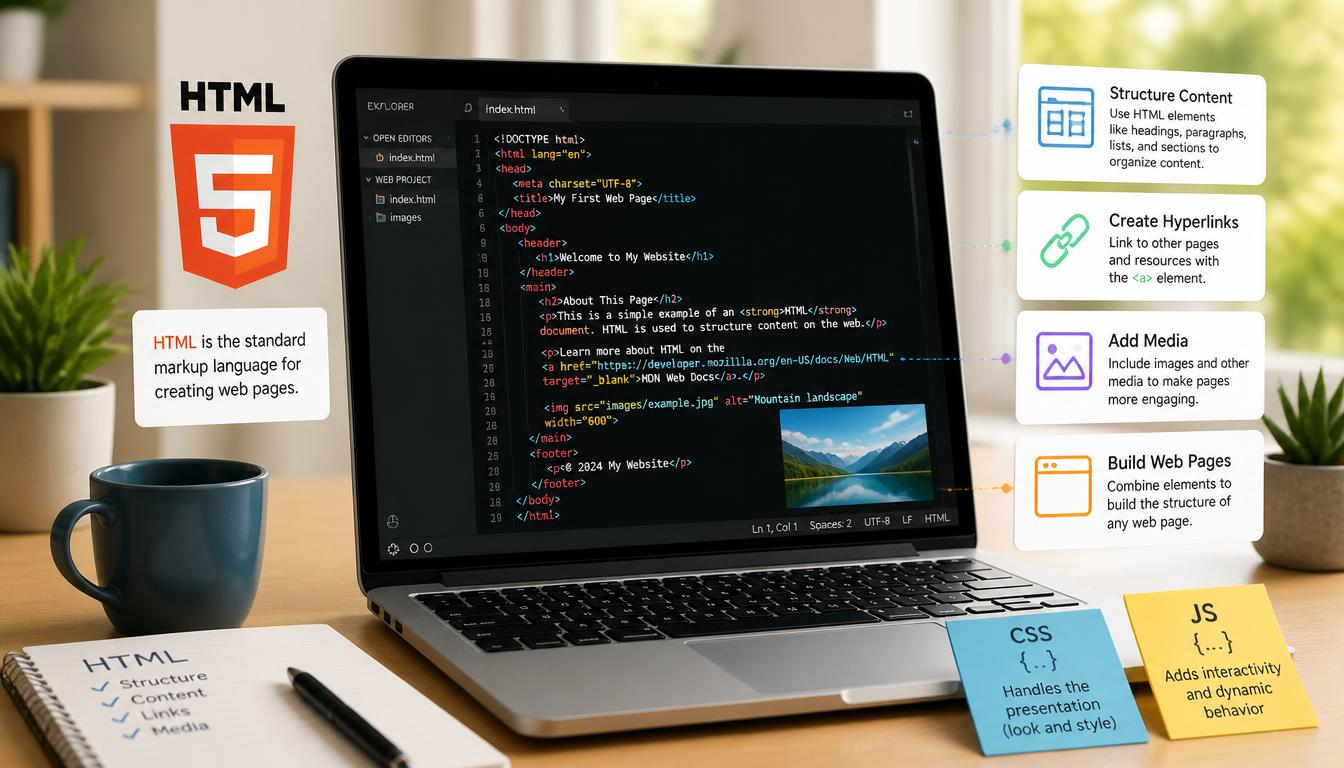
A simple HTML document might look like this:
<!DOCTYPE html>
<html>
<head>
<title>My Web Page</title>
</head>
<body>
<h1>Hello World</h1>
<p>This is my first web page.</p>
</body>
</html>
The <html> element contains the document. The <head> contains information about the page, while the <body> contains the material normally displayed in the browser.
Understanding this hierarchy makes the structure and meaning of HTML documents much easier to grasp.
A more detailed breakdown can be found in HTML Document Structure.
HTML Creates a Document Tree
Elements can sit inside other elements. A paragraph might appear inside an article, which appears inside the page body.
This nested arrangement creates a tree-like document structure. Browsers analyse that structure when constructing the page they eventually display.
For a more detailed explanation of what happens during this process, see How Browsers Read HTML.
7. HTML Gives Content Meaning
HTML does more than tell a browser where paragraphs and headings appear. Modern HTML can also describe what different parts of a page actually represent.
Semantic HTML Describes Purpose
Elements such as <header>, <nav>, <main>, <article> and <footer> provide clues about the purpose of different areas of a document.
For example, <nav> identifies navigation links, while <article> identifies a self-contained piece of content.
This approach is known as semantic HTML. It creates a clearer HTML elements and semantic web structure, helping browsers and other technologies understand how the content is organised.
You can explore this subject further in Semantic HTML Explained.
HTML Works with CSS and JavaScript
HTML is only one part of modern web development.
A useful beginner’s model is:
HTML = structure
CSS = presentation
JavaScript = behaviour
HTML might define a heading. CSS can determine its font, colour, size and spacing. JavaScript can make something happen when a visitor interacts with the page.
This separation allows each technology to concentrate on a different job.
For more detail, compare CSS and HTML: What’s the Difference? and JavaScript and HTML: How They Work Together.
Why HTML Is Still Essential
Web technology has changed enormously since the early days of the World Wide Web, but HTML remains fundamental.
Modern HTML supports far more than simple headings and paragraphs. It provides elements for audio, video, forms, graphics and meaningful document sections. The development of HTML5 helped formalise many of the capabilities associated with today’s web.
You can explore those additions in HTML5 Features Explained or trace the language’s development through The Evolution of HTML.
For readers who want to experiment with HTML after understanding the basics, freeCodeCamp’s Introduction to HTML Basics provides another beginner-oriented learning resource.
HTML is worth understanding even if you never intend to become a web developer. It explains why web pages have structure, how links connect information and how browsers distinguish one type of content from another.
Once you understand hypertext markup language, much of what happens behind an ordinary web page stops looking mysterious. HTML provides the underlying structure; CSS controls much of the appearance; JavaScript adds behaviour. Together, they form the core technologies behind the modern web.